Menu
A UX/UI Case Study in Visual Design, Progressive Disclosure & Conversion Optimisation
My Roles
Team

About AudioEye
AudioEye is a web accessibility platform that offers accessibility automation and expert services to ecommerce, government, and web based tools. AudioEye’s function is to improve web accessibility and meet compliance standards.
Their mission is to solve web accessibility at scale for assistive technology users, creating equity for all.
In 2025, AudioEye’s theme was clarity in foundations
Simplify terminology for newcomers to the space
Clarify the real stakes of inaccessibility for both businesses and end-users
Show, don’t tell AudioEye's value when it came to accessibility at scale
5
departments,
14
people
My Roles
Lead Designer
Contributed to Design System
Collaborated cross-department
Interrim Project Manager
Led Stakeholder Presentations
Customer Journey Mapping
Moderated Workshops / Braintstorming
The situation
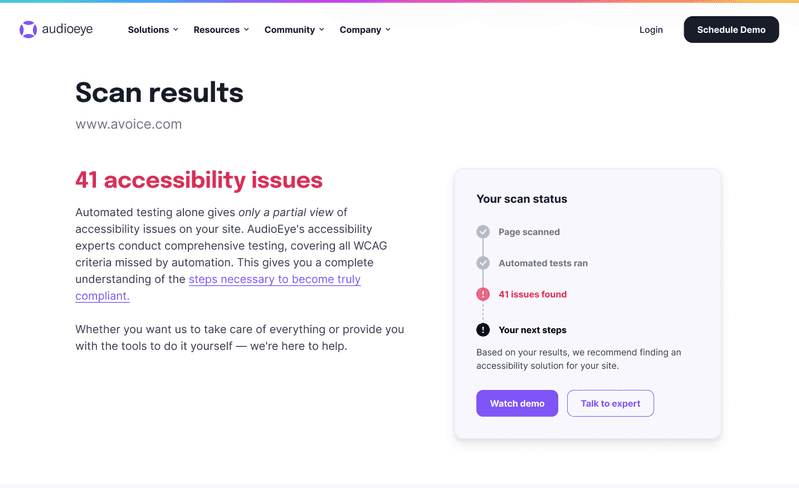
The main lead capture tool was an accessibility scanner that could detected issues present on their homepage, and positioned their tool as the solution for maximum potential complaince - but the conversion rate was steadily declining.
Early insights from the team
01
01
Most of our users don’t understand the complex jargon - let alone what web accessibility really entails
02
01
Our tool only shows the issues at detected, but not how we would fix them, and our free trial doesn’t add much clarity, or convert larger customers well
03
01
Past company goals pushed expert services too early in the customer journey, jumping in before they knew what web accessibility meant
Project Timeline
We approached the Scanner Update in 2 phases: Phase 1 with major copy edits in line with updated product messaging and to accommodate other major initiatives with a website migration, and Phase 2 to incorporate the new features available to our team with an API update, allowing us to see which issues are fixable with audioeye, and some general fix advice.
Jan 2025
Project Kickoff
Project broken into 2 phases for CMS launch, and awaiting API updates
Feb 2025
API update
Product X Marketing overlap - our API can now detect what issues we can fix!
April 2025
Phase 1 launched
Phase 1 design is live on newly migrated website! Tests on new simplified terminology launched
June 2025
New Feature
Issues are mapped to fix advice from product api
August 2025
User testing
High fidelity tests conducted to assess understanding of “fix with audioeye” value
September 2025
Phase 2 launched
New design shipped!
Evaluating the original design
Many issues were clear looking at the scanner - but others were hotly debated. Key areas were investigated further with customer interviews later on.


Pictured: a user trying to learn what the heck compliance means
My hypothesis:
We have to create context for what a User’s compliance status means for them - create actual stakes within their accessibility issue count. Then we can show value for how much time and money AudioEye can save them.
My hypothesis:
We have to create context for what a User’s compliance status means for them - create actual stakes within their accessibility issue count. Then we can show value for how much time and money AudioEye can save them.
Key Persona - The website owner
Our criteria for our focused Persona was:
They are using the scanner as a deciding factor for purchasing an accessibility tool
They are likely to be part of the sales conversations down the line (Decison-maker or otherwise)
That narrowed things down to our key persona, the Digital Marketing Specialist
Digital Marketing Specialists:
Own or maintain the website
Likely in ecommerce or SaaS
Low exposure to web accessibility
Limited development resources

Workshops
Our team’s biggest challenge was educating the user quickly on what compliance means for them, and tying the accessibility issues to compliance status directly.


Discovery
Though testing was conducted later in the process than I had hoped, we found incredibly helpful insights from our 6 lookalike users
3 Card intro
Lookalike users liked the breakdown of compliance status, issue count, and severity to help understand their current state at a glance
Desire for perspective
Users wanted a way to see and understand how their customers were. suffering from their specific accessibility issues
Before and after resonated
Design systems are only as good as how often they’re used. I subscribe to identifying key patterns to start, and growing systems that serve the changing tools, serve the best good to the user, and save our development teams some time and effort
How was AI used?
At this point in time, very minimally in the design process, but for full transparency here is where LLMs and AI tools were used:
User testing synthesis
Claude was used by our Digital marketing manager to synthesize the findings and scan for patterns from the user interviews.
I personally reviewed the quotes and transcripts to ensure no hallucinations altered any direct quotes.
Heap Analysis
Our website analytics tool’s heatmap and bounce-rate data was exported and fed through claude to help create customer journey maps.
Development
Cursor was used in developing the API integration and in some of the CSS development, translating figma designs to the code base.
Final Design
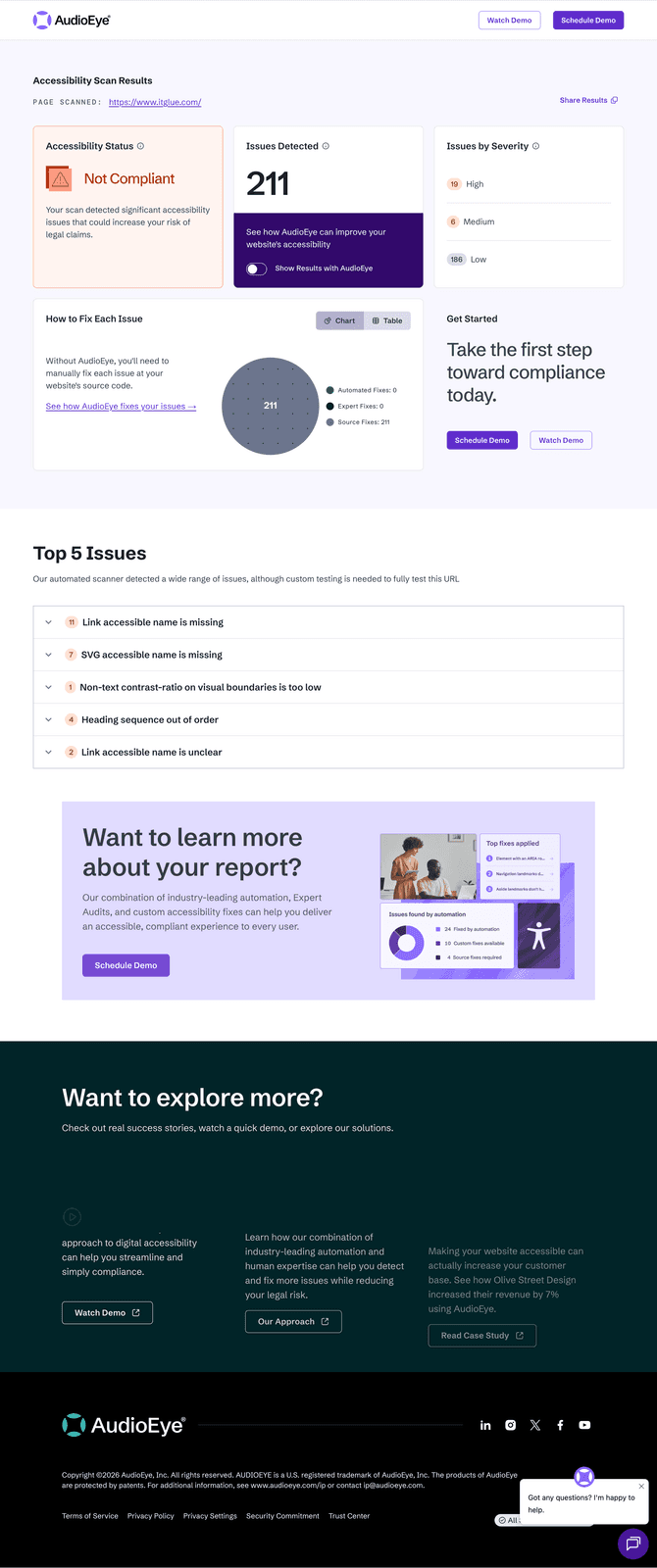
On landing
Toggle switched